> For the complete documentation index, see [llms.txt](https://writeups.ayweth20.com/llms.txt). Markdown versions of documentation pages are available by appending `.md` to page URLs; this page is available as [Markdown](https://writeups.ayweth20.com/2025/404ctf-2025/renseignement-en-sources-ouvertes/un-peu-de-vacances.md).
# Un peu de vacances
**Catégorie:** Renseignement en sources ouvertes - **Difficulté:** Moyen
{% file src="/files/eMO3xTfS1lLi2JJGobEb" %}
**Description:**
Solution:
Pour ce challenge, nous avions simplement un audio provenant d'une personne disant qu'elle était en Guyane et qu'elle venait de visiter la base de Kourou.
Cependant il ne fallait pas retrouver où cette personne était, mais comment nous pouvions le savoir.\
Pour ce faire, il y avait plusieurs infos intéressantes à prendre en compte :
* Le bruit des feuilles qui craquent sous ses pieds
* Le cris d'oiseaux en arrière plan
* Le fait qu'il est visité "l'usine, des pièces et les étages de la fusée"
Bon donc ces pistes sont intéressantes, mais la seule réellement exploitable et intéressante est celle des oiseaux.
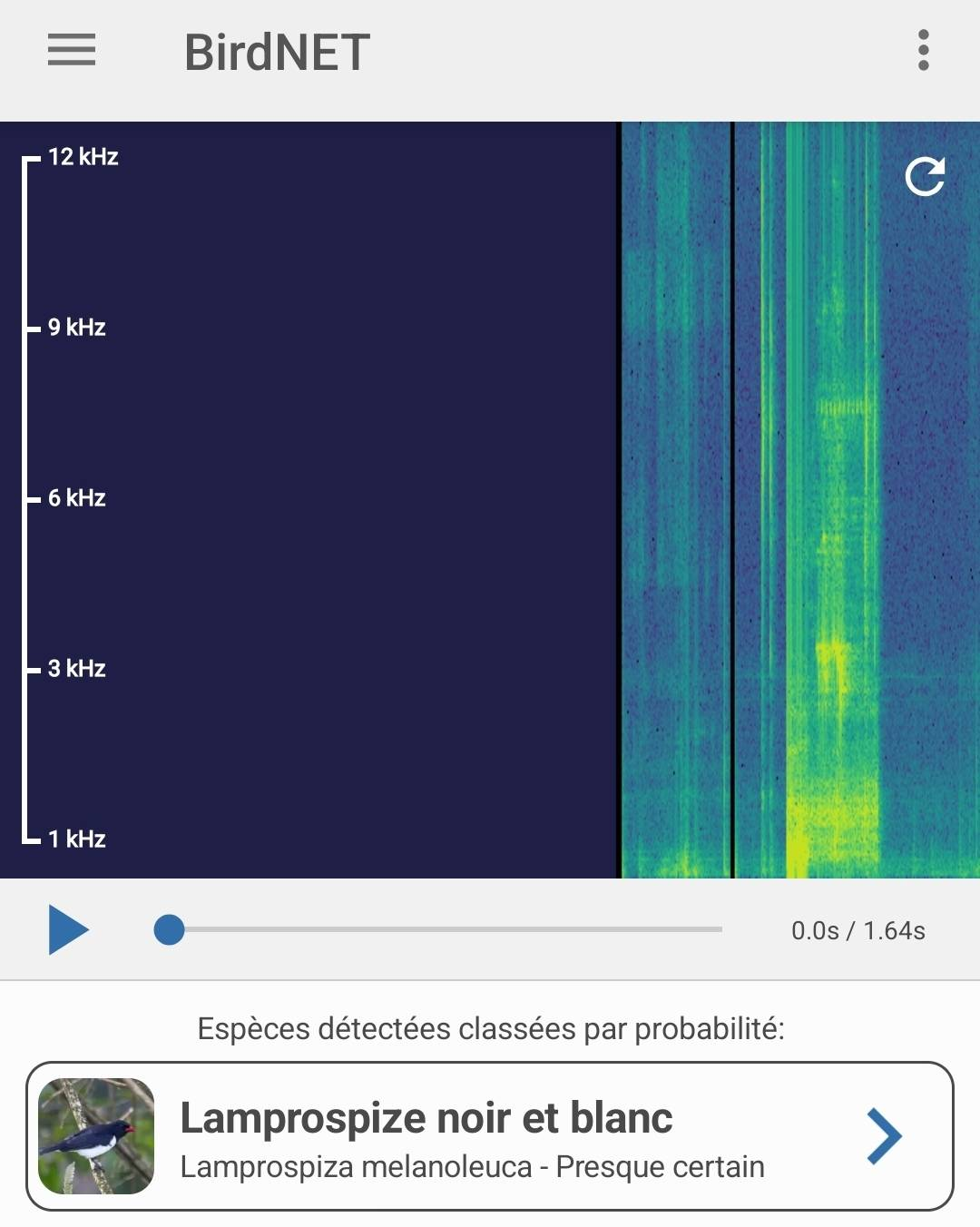
N'étant pas ornithologue, j'ai cherché une appli qui pourrait nous aider à reconnaitre le son émis par un oiseau, et ça existe : [BirdNET](https://www.conservatoiredufreinet.org/ressources/birdnet-une-appli-qui-reconnait-les-chants-des-oiseaux/) ([lien vers le Play Store](https://play.google.com/store/apps/details?id=de.tu_chemnitz.mi.kahst.birdnet\&hl=fr)).\
En ouvrant cette application, on nous invite à faire un enregistrement.
Nous allons donc jouer la partie de l'oiseau pendant l'application enregistre et voici les résultats :
*Désactiver la position aide fortement à améliorer les résultats, car il cherche également en fonction de votre position (un peu con quand on habite en région parisienne* ��*).*
Maintenant que nous avons cette info, nous pouvons vérifier sur Google et le "[Lamprospize noir et blanc](https://www.oiseaux.net/photos/sylvain.uriot/tangara.noir.et.blanc.2.html#monde)" ou "[Tangara noir et blanc](https://www.oiseaux.net/photos/sylvain.uriot/tangara.noir.et.blanc.2.html#monde)" est bien présent en Guyane.
Nous avons donc validé ce challenge grâce à cette application surprenante.
🚩FLAG
`404CTF{tangara_noir_et_blanc}`